> For the complete documentation index, see [llms.txt](https://faq.wanttopay.net/wanttopay-app/llms.txt). Markdown versions of documentation pages are available by appending `.md` to page URLs; this page is available as [Markdown](https://faq.wanttopay.net/wanttopay-app/instrukcii/kak-smenit-region-v-app-store.md).
# Как сменить регион в App Store
Смените регион в Apple ID, чтобы пользоваться App Store и оплачивать подписки в другом регионе. Сейчас Apple позволяет менять регион даже при активной подписке iCloud+.
**Перед сменой региона:**
1. Потратьте оставшиеся деньги на балансе Apple ID, если они есть.
2. Если баланс не получается обнулить самостоятельно, обратитесь в поддержку Apple.
3. Если у вас активна подписка Apple Music, проверьте возможность смены региона — у части пользователей с такой подпиской возникают сложности.
#### Как сменить регион
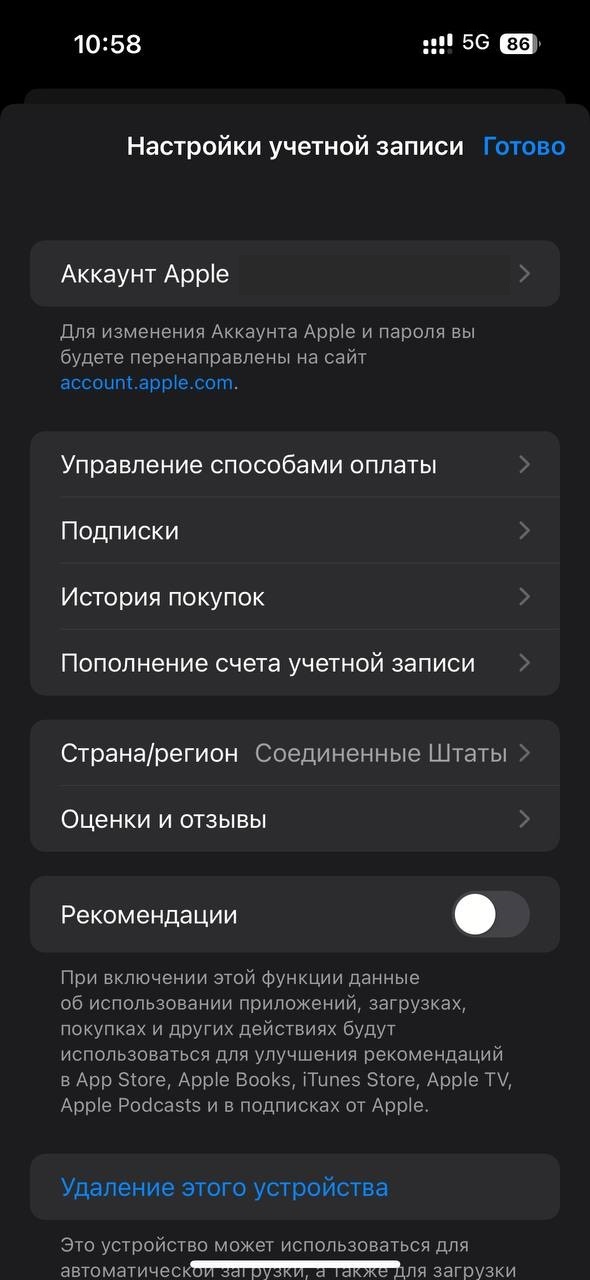
1. Откройте **Настройки**.
2. Нажмите на **Аккаунт Apple** в верхней части экрана.
3. Выберите **Контент и покупки**.
4. Нажмите **Посмотреть**.
5. Выберите **Страна и регион**.
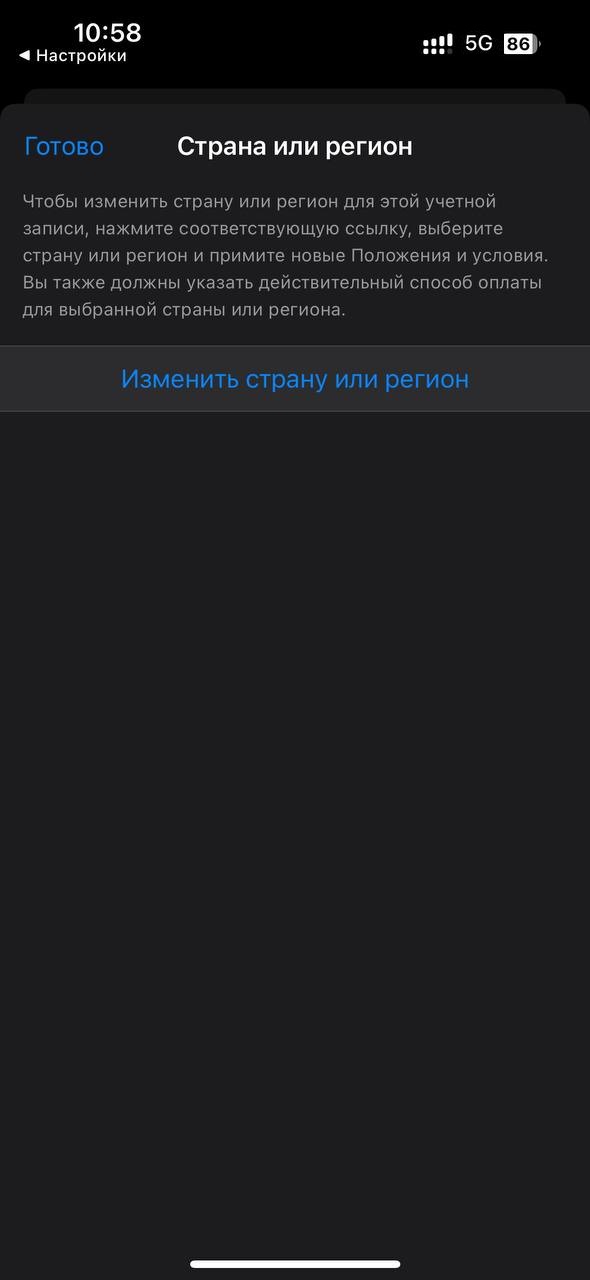
6. Нажмите **Изменить страну или регион**.
7. Выберите нужный регион.
Регион можно изменить без привязки банковской карты — при заполнении данных выберите способ оплаты None / Нет и укажите имя и фамилию латиницей.
#### Нюансы
* Активная подписка **iCloud+** не обязательно мешает смене региона и продолжает действовать.
* При наличии средств на балансе Apple ID сменить регион не получится, пока баланс не будет обнулён.
* При активной подписке **Apple Music** смена региона может не сработать.
* Если Apple потребует добавить платёжный метод, для оплаты iCloud и покупок в App Store можно использовать виртуальную карту Wanttopay.
---
# Agent Instructions
This documentation is published with GitBook. GitBook is the documentation platform designed so that both humans and AI agents can read, navigate, and reason over technical content effectively. Learn more at gitbook.com.
## Querying This Documentation
If you need additional information that is not directly available in this page, you can query the documentation dynamically by asking a question.
Perform an HTTP GET request on the current page URL with the `ask` query parameter, and the optional `goal` query parameter:
```
GET https://faq.wanttopay.net/wanttopay-app/instrukcii/kak-smenit-region-v-app-store.md?ask=&goal=
```
`ask` is the immediate question: it should be specific, self-contained, and written in natural language.
`goal` is optional and describes the broader end goal you are ultimately trying to accomplish on behalf of the user. GitBook uses it to tailor the answer towards what is most useful for that goal.
The response will contain a direct answer to the question and relevant excerpts and sources from the documentation.
Use this mechanism when the answer is not explicitly present in the current page, you need clarification or additional context, or you want to retrieve related documentation sections.


.png?alt=media&token=d0f68361-b0ec-4e9e-bd05-778bf83aeb0b)