> For the complete documentation index, see [llms.txt](https://faq.wanttopay.net/wanttopay-app/llms.txt). Markdown versions of documentation pages are available by appending `.md` to page URLs; this page is available as [Markdown](https://faq.wanttopay.net/wanttopay-app/english/kak-polzovatsya-kartoi/popolnenie-i-balans/oplata-i-popolnenie-v-kriptovalyute.md).
# Payment and top-up in cryptocurrency
You can pay for the issuance of a Wanttoopay card using cryptocurrency through the Cryptomus payment service. The following coins are supported: USDT, USDC, TON, BTC, BNB, ETH — choose any that is available in your wallet or on the exchange.
{% hint style="info" %}
Important: this guide applies both to paying for a card and to topping up a card through Cryptomus. Just select the card you need and follow the steps below.
{% endhint %}
The guide shows an example of payment through the Bybit exchange using USDT (TRC-20).
### Step 1 Card issuance
1. Go to the mini-app [@WantToPayBot](https://telegram.me/wanttopaybot)
2. Select the card you need (for example, the Prepaid plan)
3. Select the denomination (for example, $5) and the USDT payment method
4. Specify the Tron network (TRC20)
5. Click the Pay button
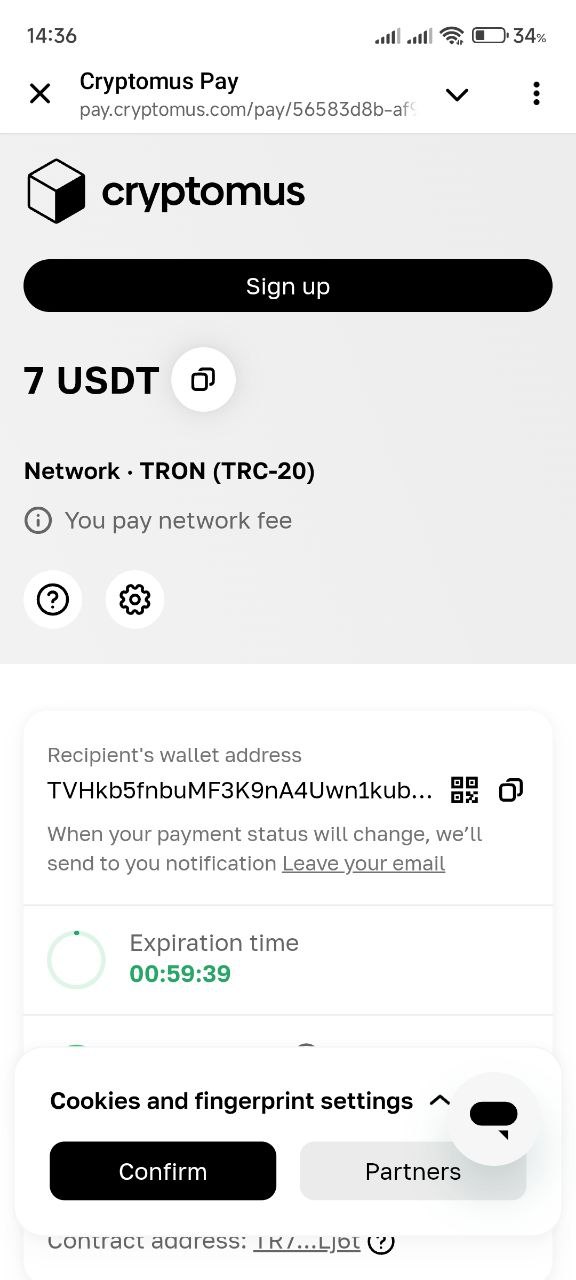
6. You will be redirected to the Cryptomus page
7. Copy the wallet address and the amount shown on the screen
### Step 2 Payment on the exchange
1. Open the crypto wallet on the Bybit exchange
2. Open the Assets tab
3. Click Withdraw
4. Select the USDT coin
5. Paste the address copied from Cryptomus
6. Make sure the TRC20 network is selected
7. Paste the address copied from the Cryptomus page (7 USDT)
8. Confirm the transaction
9. Enter the confirmation code (from email and Google Authenticator)
10. Wait for the Sent status to appear
11. Return to Telegram and wait for payment confirmation in the bot
{% hint style="info" %}
If after sending the cryptocurrency the status does not change or you have any questions, contact support via @WantToPaySupportBot.
{% endhint %}
Frequently Asked Questions:
What should I do if the money was deducted, but the status on Cryptomus was not updated?
Check:
* You entered the exact payment amount
* You selected the correct network
If everything is correct, just wait: the status is usually updated within 5–10 minutes.
If that does not happen, write to [@WantToPaySupportBot](https://telegram.me/WantToPaySupportBot)
Why is the final amount higher than the card denomination?
The amount includes:
* card denomination
* Cryptomus fee
All fees are shown before confirmation
What should I do if the payment period on Cryptomus has expired?
Create the order again in the mini-app and follow the instructions. Old links become invalid after the time expires.
I encountered an error while topping up
You can find all possible causes and solutions in the article [Top-up errors](/wanttopay-app/english/oshibki-i-resheniya/oshibki-pri-popolnenii.md).
---
# Agent Instructions
This documentation is published with GitBook. GitBook is the documentation platform designed so that both humans and AI agents can read, navigate, and reason over technical content effectively. Learn more at gitbook.com.
## Querying This Documentation
If you need additional information that is not directly available in this page, you can query the documentation dynamically by asking a question.
Perform an HTTP GET request on the current page URL with the `ask` query parameter, and the optional `goal` query parameter:
```
GET https://faq.wanttopay.net/wanttopay-app/english/kak-polzovatsya-kartoi/popolnenie-i-balans/oplata-i-popolnenie-v-kriptovalyute.md?ask=&goal=
```
`ask` is the immediate question: it should be specific, self-contained, and written in natural language.
`goal` is optional and describes the broader end goal you are ultimately trying to accomplish on behalf of the user. GitBook uses it to tailor the answer towards what is most useful for that goal.
The response will contain a direct answer to the question and relevant excerpts and sources from the documentation.
Use this mechanism when the answer is not explicitly present in the current page, you need clarification or additional context, or you want to retrieve related documentation sections.

.png?alt=media&token=cbfabcf1-3691-4e18-bd14-b20692fd91eb)


.png?alt=media&token=3fd0f2ca-50a0-48e0-b227-8fc5b463b565)